Masttro MCP server
The Model Context Protocol (MCP) is an open standard for connecting AI applications to tools and data. The Masttro MCP Server provides an authorized, read-only interoperability layer through which approved Masttro capabilities can be used by compatible external MCP clients. Masttro authenticates and authorizes each request according to the applicable Masttro integration identity, entitlements and tool scope. Information returned to the external client is thereafter processed outside the Masttro security perimeter.
What you can ask
- "What were the Hartwell family's top 10 holdings by market value at the end of September?"
- "Compare YTD TWR by asset class for client 24, in EUR."
- "Which accounts haven't received a custodian update this month?"
- "How much unfunded commitment do we have across private equity funds?"
The assistant picks the right tools, calls them and summarizes the results. Every tool is read-only: the server cannot create, change or delete anything in Masttro.
Before you start: enable MCP access
MCP access is granted per user in Masttro. Before anyone can connect a client, the first three of these must be in place. The fourth applies only if your organization signs in to Masttro with SSO:
-
Your license includes the MCP Server feature. MCP is a licensed capability. If you're not sure your license includes it, ask your Masttro representative. See MCP availability.
-
A platform administrator grants the MCP Server permission to a user profile. In Masttro, open Users → Profiles and select the profile. Under Permissions, check MCP Server, then save.
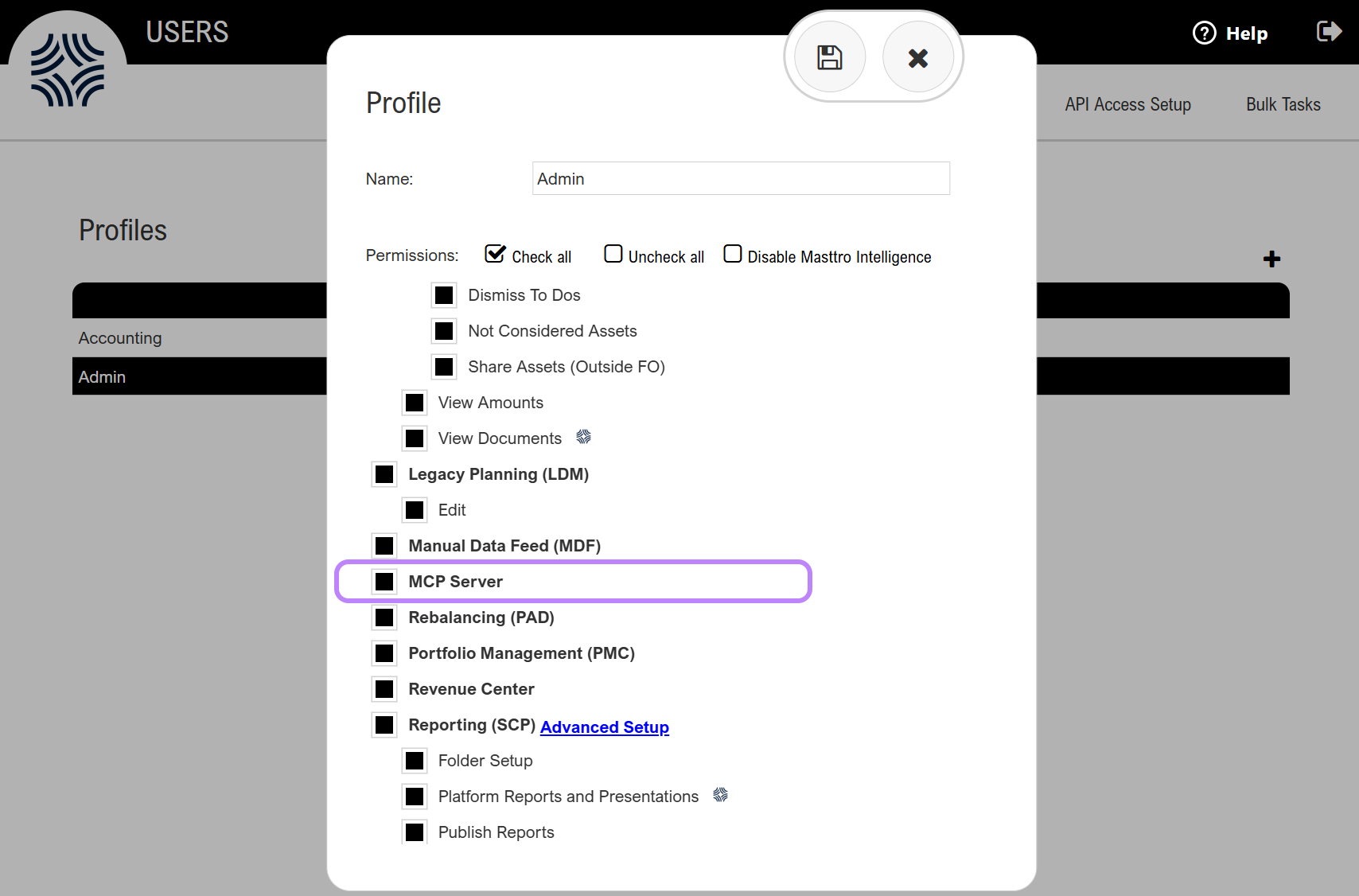
-
Each user who will connect is assigned to that profile. Users without the permission can't use the MCP server.
-
If you use SSO, your identity provider allows the Masttro OAuth redirect URI. When your users sign in to Masttro through single sign-on, the MCP sign-in also passes through your identity provider (Microsoft Entra ID, Okta, Google Workspace, Ping and others). Your identity provider administrator must add this URI to the allowed redirect (reply) URIs of the SSO application registered for Masttro:
{{MCP_SSO_REDIRECT_URI}}In Microsoft Entra ID, add it under the Mobile and desktop applications platform, not as a single-page application. In Okta, add it as a sign-in redirect URI of the existing app. Step-by-step instructions are in Single sign-on. This is a one-time change per organization and does not affect how users sign in to the Masttro web application. Users who sign in with a Masttro username and password can skip this step.
The requirement applies to every connection method: OAuth clients such as Claude, ChatGPT, Claude Code and VS Code, and your own integrations that use a bearer token.
Server details
| URL | {{MCP_URL}} |
|---|---|
| Transport | Streamable HTTP, stateless. Every message is an independent HTTPS POST, so no session or local process is needed. |
| Authentication | OAuth, with short-lived and revocable access. See Authentication. |
| Protocol | MCP 2026-07-28. 2025-06-18 is supported for legacy compatibility. See Supported protocol revisions. |
| Tools | Selected read-only tools from the Masttro API are made available through the Masttro MCP tool registry. The available tool set may differ from the REST API and may evolve over time. See the current tool catalog. |
| Results | Each tool returns the same JSON as the matching REST endpoint, as text. |
| Limits | The same rate limits as the REST API. MCP and REST calls share your per-user budget. |
Authentication
Preferred: OAuth, a short-lived and revocable authorization flow supported by both Masttro and the MCP client. Clients that cannot complete OAuth can send a bearer token in the Authorization header.
| Method | Best for | Notes |
|---|---|---|
| OAuth (recommended) | Claude, Claude Code, VS Code and other clients that support MCP authorization | The client runs the Masttro authorization flow and refreshes access automatically. Access can be revoked without rotating your API secret. |
Authorization: Bearer <token> | Your own applications and agents | Expires after 60 minutes. Your code must refresh it with POST /Auth/Token. |
If your organization uses SSO, the OAuth sign-in redirects through your identity provider, which must allow the Masttro redirect URI. See SSO prerequisite and Single sign-on.
Permissions and audit
- Only users whose profile has the MCP Server permission can use the server. See Before you start.
- Tools only return clients and data that the integration identity is entitled to access. Masttro enforces permissions and entitlements at the point of request.
- Each authenticated request and tool call is recorded in Masttro's audit log against the applicable integration identity.
Masttro audit records cover authenticated requests and tool activity within Masttro. They do not provide an audit trail of how returned information is subsequently stored, processed, summarized, shared or retained by the receiving third-party application.
Supported protocol revisions
The Masttro MCP Server supports the protocol revisions listed here. Client examples in this guide are tested against those revisions. Compatibility with older revisions may be maintained for a defined period but is not implied unless documented.
| Revision | Status |
|---|---|
2026-07-28 | Current |
2025-06-18 | Legacy compatibility |
Errors
When a call fails, for example because of an invalid client id or a missing required argument, the tool returns an error result carrying the same message as the REST API (see Errors). Assistants typically read the message and correct their next call. Authentication failures and rate limits are returned as HTTP 401 and 429 before any tool runs.
Third-party applications
Masttro MCP may be configured in compatible third-party MCP clients. Availability, features, authentication requirements, data handling and behavior within those applications are controlled by the respective third-party provider. Unless expressly stated otherwise, compatibility with a third-party MCP client does not constitute a native marketplace integration, endorsement or commercial partnership between Masttro and that provider.